

The problem
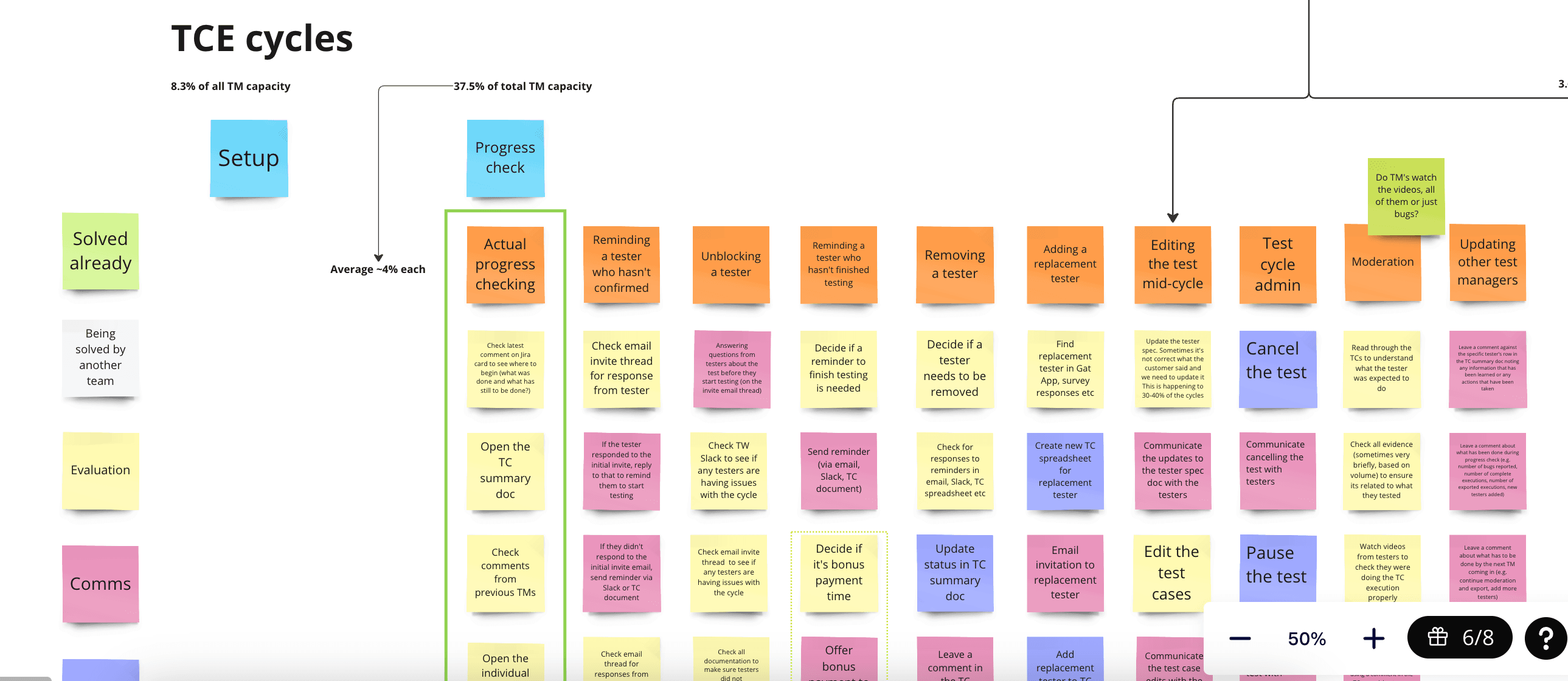
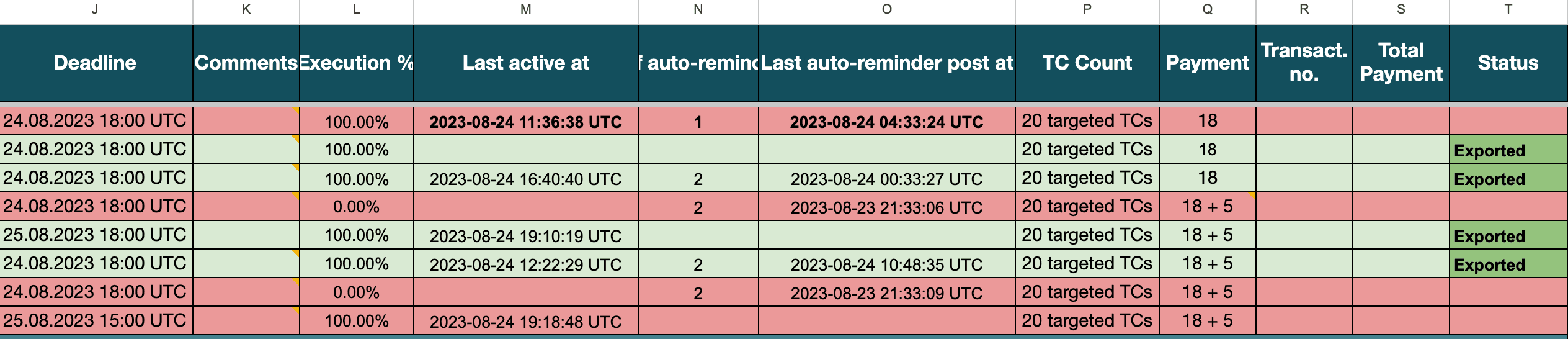
Test Managers relied on manually maintained spreadsheets to coordinate up to 15 test cycles at once. Repetitive data entry increased operational overhead and the risk of human error, leaving less time to ensure test quality.
User research
I ran weekly research sessions with 6 Test Managers over 12 sessions. I observed them navigating their current processes. From this study I discovered:
- •Test Managers were using spreadsheets for all data management.
- •The testing process involved distinct stages: launching tests, moderating results, and delivering outcomes.
- •Each stage involved multiple repetitive manual tasks, consuming significant time and increasing the risk of human error.
User personas
Sarah Chen
Senior Test Manager
“I spend more time managing spreadsheets than actually ensuring quality.”
8+ years in QA, manages 15-20 concurrent test cycles, works with Fortune 500 clients. Values precision and reliability over speed.
✓Goals
- Deliver high-quality test results on time
- Reduce repetitive manual tasks
- Have clear visibility into test progress
- Build trust with enterprise clients
✕Frustrations
- Constant context-switching between tools
- Manual data entry prone to errors
- Difficulty tracking tester performance
- No single source of truth for test status
Marcus Rodriguez
Junior Test Manager
“I never know if I'm doing things the right way. There's no standardised process.”
1 year in role, previously a tester. Eager to grow but overwhelmed by complexity. Needs guardrails and confidence-building.
✓Goals
- Learn best practices quickly
- Avoid mistakes that impact clients
- Get guidance on edge cases
- Prove value to the team
✕Frustrations
- Steep learning curve with no documentation
- Fear of making costly errors
- Inconsistent processes across team members
- No feedback on decision quality
Enabling ML
The dashboard wasn't just replacing spreadsheets. It was laying the groundwork for Machine Learning features that weren't possible before.
With structured data in one place, the platform could now:
- •Learn which testers produced the best results
- •Auto-invite top performers to future tests
This saved Test Managers time on manual tester selection and improved match quality over time.
Design decisions
Choosing the layout
The core of the platform was a dashboard showing tester status and progress. Test Managers needed to see, at a glance, how many testers had completed the test and where things stood.
I explored three options:
Flat List
All testers in a simple table.
- Simple to build
- Familiar pattern
- But unmanageable with 50+ testers. No device context.
Card Layout
Rich cards with photos and progress in a grid.
- Looks modern
- But poor density. Too much scrolling.
Grouped Table
Testers grouped by device. Collapsible sections. Status indicators.
- Matches how Test Managers already think
- High density
- Quick to scan
I chose the grouped table. It preserved the spreadsheet familiarity they relied on. And the grouping matched their device-first mental model.
The solution
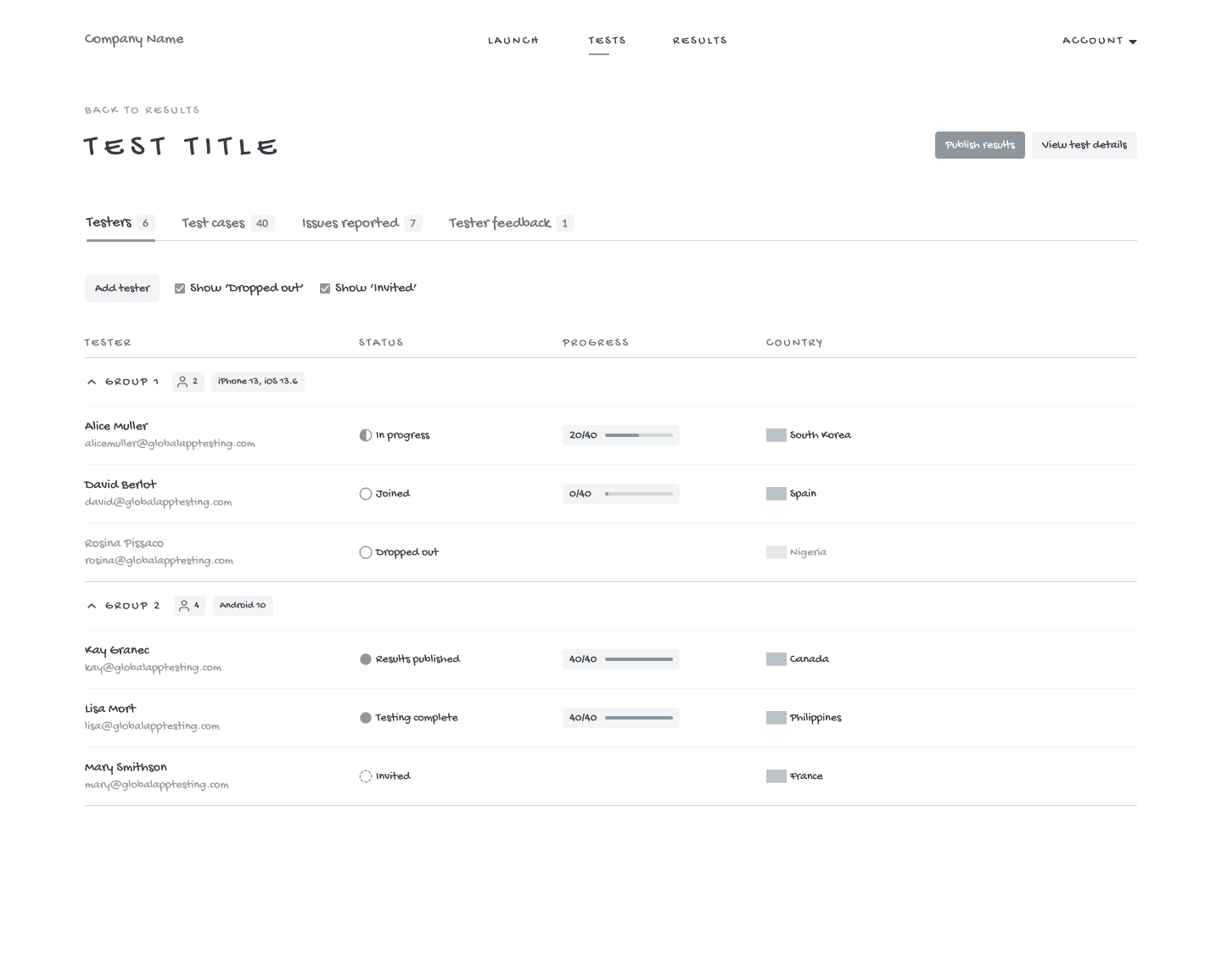
I designed a dashboard that replaced the spreadsheet Test Managers used to track testers.
The interface shows:
- •Live status of the test run with time remaining
- •Testers grouped by device and OS (Group 1: iPhone 13, iOS 13.6 / Group 2: Android 10)
- •Status for each tester: Invited, Joined, In progress, Testing complete, Results published, Dropped out
- •Progress bars showing completion (e.g., 20/40 test cases)
- •Country for each tester
- •Filters to show or hide edge cases like "Dropped out" and "Invited"
The grouped table matched how Test Managers already thought about their work. When something went wrong with iOS testing, they could focus on that group. The status indicators and progress bars gave them real-time visibility without refreshing a spreadsheet.
Wireframes
Hi-fidelity designs

Challenges
After launch, adoption was low. Test Managers weren't using the new dashboard for most of their clients. We had aimed for 90-95% adoption, but we weren't close.
I worked with Test Managers to understand why. Together, we identified which tests were simple enough to run in the new dashboard and which ones needed customisation. The customised ones still had to run outside the platform.
What we found: around 50-60% of cases could run in the dashboard. Once Test Managers understood which tests fit, adoption increased. They trusted the system for the right use cases instead of avoiding it entirely.
Influencing decisions
Business leadership wanted to auto-approve bug reports without human review. More automation would look better in sales demos and speed up delivery time.
I didn't push back directly. I reframed it as a risk question. I showed research clips of Test Managers saying their biggest fear was automation mistakes reaching clients. I estimated what one high-profile error could cost.
Then I proposed an alternative. Auto-approve only low-severity, high-confidence items. Human review for everything else.
Leadership agreed. We got 80% of the efficiency gains with much lower risk.
Design system
I built a component library for the platform. It was later adopted across other products.

Status Indicators
Coloured dots showing tester state: Invited, Joined, In progress, Testing complete, Results published, Dropped out

Progress Bar
Shows test case completion (e.g., 20/40)

Grouped Data Table
Collapsible sections organised by device and OS

Filter Checkboxes
Show or hide edge cases like "Dropped out" and "Invited"

Tabs with Counts
Quick navigation showing totals (Testers 7, Test cases 40, Issues reported 7)

Live Badge
Shows test status and time remaining
I documented each component with usage guidelines and accessibility notes. For example, the status indicators use colours that meet WCAG AA contrast standards. I also added text labels alongside colours so users with colour blindness can distinguish between states.
Weekly reviews with engineering kept design and code aligned.
35%
Operational overhead reduced, saving each Test Manager around 8 hours per week. Measured with Metabase analytics and user surveys.
50%
User satisfaction improved, with Test Managers reporting higher confidence in their reports.
28%
Test completion rate increased. Automated tester matching and progress tracking reduced bottlenecks and missed deadlines.
What I learned from this project
What worked
Showing leadership actual user research clips built shared understanding. It made conversations easier.
What I'd do differently
Establish automation design principles as a shared framework from day one. I spent time on transparency and trust but didn't always communicate why it mattered to the rest of the team.
